
OpenTelemetry has become the default for instrumenting modern systems. Adopting it shouldn't be the hardest part of your week — but for a lot of teams, it is. The collector config alone gives most engineers their first 400-line YAML file and their first 3 a.m. pipeline restart.
This blog is where we'll write about the parts of OpenTelemetry that trip people up, the collector configurations we keep seeing in the wild, and what we're shipping in Telflo.
What you'll find here
Three buckets:
- OpenTelemetry deep dives — how individual components actually work, the gotchas they hide, and what to do when behavior surprises you. Receivers, processors, exporters, extensions, the lot.
- Collector config patterns — concrete, working setups for the situations teams face: fanning out to multiple backends, sampling at scale, redacting PII before export, separating logs from traces, surviving a backend outage without dropping data.
- Product updates — what's new in Telflo, what we're working on, and what we've learned from the people using it.
Let's start with a small but useful one.
A clean starter: OTLP in, two backends out, batched and resilient
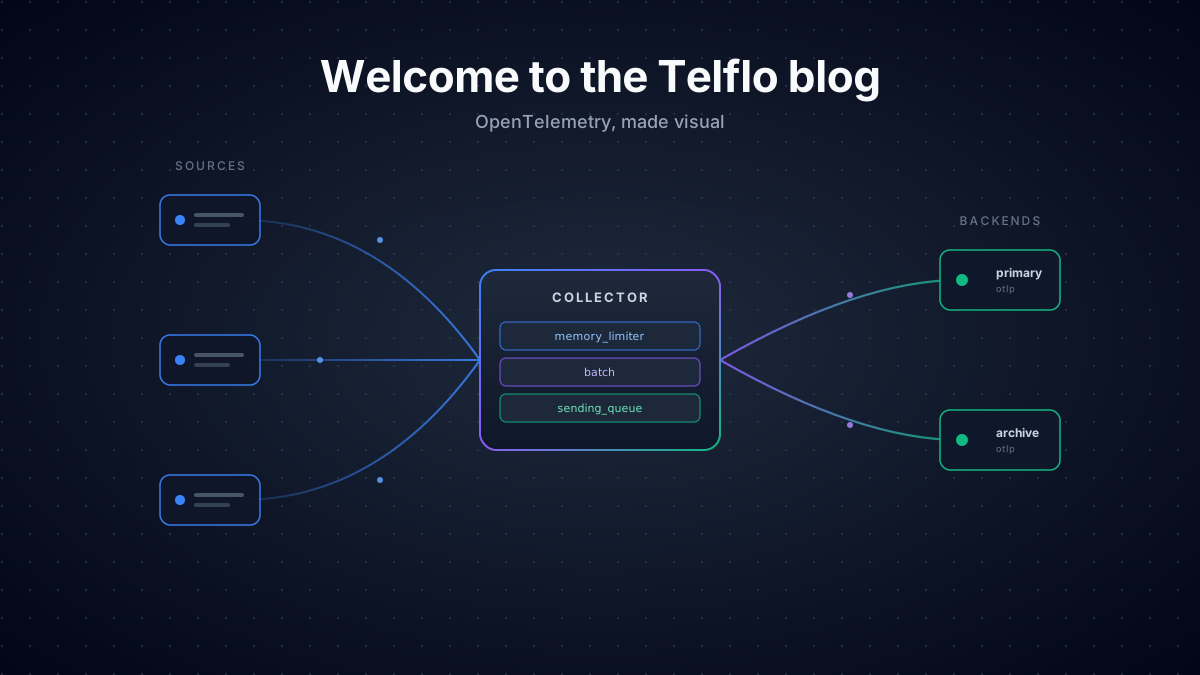
A common first setup: receive OTLP from your apps, batch it, and send it to two different backends — typically your existing observability vendor plus a cheaper long-term store. You also want it to keep working when one of those backends has a bad day.
Here's the minimum config that gets you there safely:
receivers:
  otlp:
    protocols:
      grpc:
        endpoint: 0.0.0.0:4317
      http:
        endpoint: 0.0.0.0:4318

processors:
  memory_limiter:
    check_interval: 1s
    limit_percentage: 80
    spike_limit_percentage: 25
  batch:
    send_batch_size: 8192
    timeout: 5s
    send_batch_max_size: 10000

exporters:
  otlp/primary:
    endpoint: primary-backend.example.com:4317
    sending_queue:
      enabled: true
      num_consumers: 4
      queue_size: 1000
    retry_on_failure:
      enabled: true
      initial_interval: 5s
      max_interval: 30s
      max_elapsed_time: 300s
  otlp/archive:
    endpoint: archive-backend.example.com:4317
    sending_queue:
      enabled: true
      queue_size: 5000
    retry_on_failure:
      enabled: true

service:
  pipelines:
    traces:
      receivers: [otlp]
      processors: [memory_limiter, batch]
      exporters: [otlp/primary, otlp/archive]
    metrics:
      receivers: [otlp]
      processors: [memory_limiter, batch]
exporters: [otlp/primary, otlp/archive]There are four things in here worth pointing out, because they're the difference between a config that demos well and a config that survives production.
memory_limiter goes first, always
The memory_limiter processor is the only thing standing between you and an OOM-killed collector. It must be first in the pipeline so it can refuse new data before downstream processors allocate memory for it. Putting it after batch is a common mistake and defeats the point — by then the memory has already been allocated.
batch is non-negotiable for export performance
Without a batch processor, every span and metric point becomes its own export call. With it, you're sending thousands per request. The default batch size of 8192 works well for most setups; bump send_batch_max_size if your backend accepts it.
sending_queue + retry_on_failure decouple your apps from your backend
Without a sending queue, an exporter failure backpressures all the way up to your apps. With it, the collector buffers in memory and keeps accepting data while it waits for the backend to recover. Pair it with retry_on_failure and you get graceful degradation instead of a cascading failure. Tune queue_size based on how long an outage you want to tolerate.
Two named exporters, one pipeline
The otlp/primary and otlp/archive syntax is how you instantiate two separate exporters of the same type. Both names get listed in the pipeline's exporters: array — the collector fans out automatically. If archive goes down, primary keeps working — and vice versa.
What's next
Next up: monitoring Kubernetes with the OTel Collector — both the cluster itself (nodes, kubelet, control plane) and the workloads running on it. We'll cover which receivers actually pull their weight, the DaemonSet-plus-Deployment pattern that scales past a few dozen nodes, and the handful of ways that pipeline quietly drops data when you're not watching.
If you'd rather not write all this by hand, Telflo builds these configs visually with the same components and validates them as you go — try it free →.
Manage your OpenTelemetry collectors with Telflo today.
Design, test, and deploy OpenTelemetry Collectors in one platform.
Sign up now