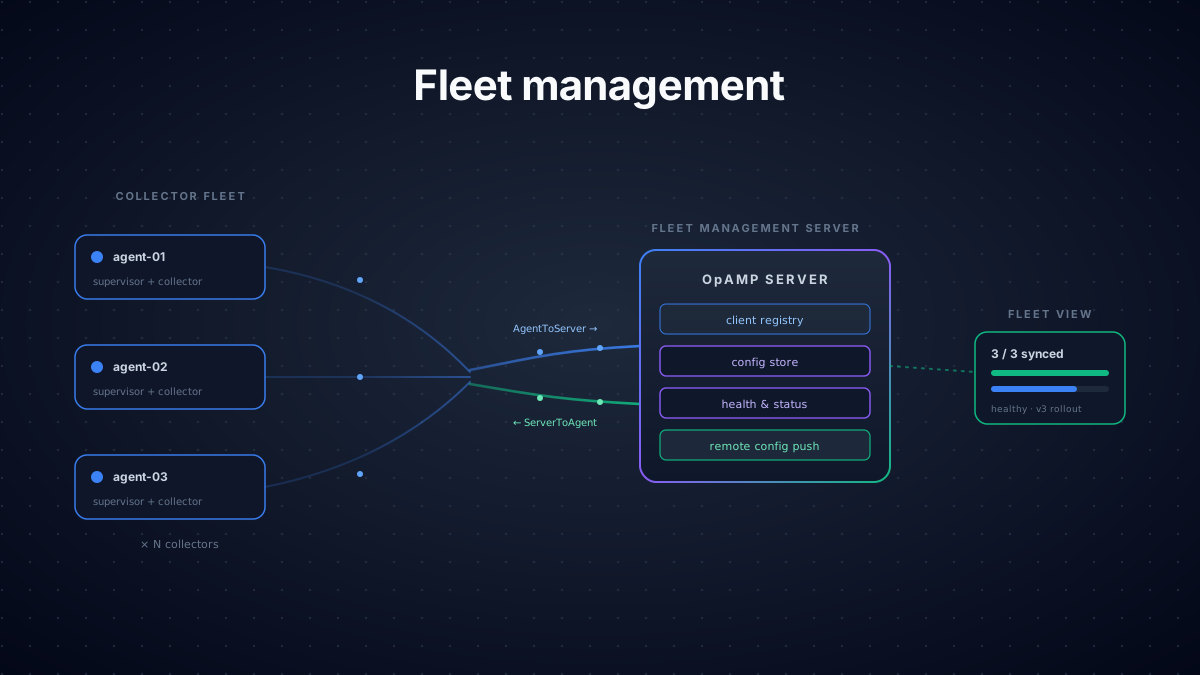

While OpenTelemetry provides a powerful solution for instrumenting systems, it is, at its core, an agent running a static configuration in isolation. Of course it can send and receive data, but the configuration that it operates against is immutable without manual (i.e. expensive/error-prone/mundane) engineering intervention. Managing even a single instance configuration can be challenging, and for larger fleets the complexity quickly leads to:
- Difficult Upgrades: Updates to configurations across a fleet of machines are time-consuming, tedious, and error-prone.
- Configuration Drift: Manually updating machines increases the risk of collectors operating against inconsistent configurations.
- Rollback Challenges: Should a mistake be made, reverting the changes to a prior state is a costly endeavor.
- Visibility Challenges: Reporting which machines are on which versions becomes difficult.
Of course there are more challenges than these (incremental rollouts, auto-scaling difficulties), but let's not beat a dead horse (no change history, no error reporting, no collector health visibility).
Ok, so there are a lot of challenges managing deployments, but that kind of makes sense; the open telemetry collector is a data collector solution, not a data collector management solution. And so you're left thinking "Guess I'll go with an expensive, proprietary, high switching cost, poorly documented vendor solution." I understand. Fortunately I have good news...and bad news...and great news!
The Good News
Within the OpenTelemetry Contrib solutions is the OpAMP Supervisor. What is this beautiful piece of configuration management software you ask? Well only a client-side implementation of the Open Agent Management Protocol OpAMP...mostly a client-side implementation of the OpAMP protocol at least. But this little piece of software has some big advantages that help wrangle the chaos of open telemetry collector management. Before we dig into the Supervisor, let's start with a brief overview of the OpAMP Specification.
OpAMP Overview
As a protocol, OpAMP is a specification and in this case one that defines the communication mechanism between a client whose function is to act as a collector management orchestrator, and a server whose function is to appropriately respond to client requests. The intent then is to define a standard message exchange so that capabilities such as system status reporting, metadata reporting, and...ding ding ding...remote agent configuration can be enabled.
So what does this spec look like? Well the "language" of the spec is a set of defined properties that are transmitted as a sequence of protobuf-encoded messages. The message properties are defined as
Request Messages
message AgentToServer {
    bytes instance_uid = 1;
    uint64 sequence_num = 2;
    AgentDescription agent_description = 3;
    uint64 capabilities = 4;
    ComponentHealth health = 5;
    EffectiveConfig effective_config = 6;
    RemoteConfigStatus remote_config_status = 7;
    PackageStatuses package_statuses = 8;
    AgentDisconnect agent_disconnect = 9;
    uint64 flags = 10;
    ConnectionSettingsRequest connection_settings_request = 11; // Status: [Development]
    CustomCapabilities custom_capabilities = 12; // Status: [Development]
    CustomMessage custom_message = 13; // Status: [Development]
    AvailableComponents available_components = 14; // Status: [Development]
    ConnectionSettingsStatus connection_settings_status = 15; // Status: [Development]
}Response Messages
message ServerToAgent {
    bytes instance_uid = 1;
    ServerErrorResponse error_response = 2;
    AgentRemoteConfig remote_config = 3;
    ConnectionSettingsOffers connection_settings = 4; // Status: [Beta]
    PackagesAvailable packages_available = 5; // Status: [Beta]
    uint64 flags = 6;
    uint64 capabilities = 7;
    AgentIdentification agent_identification = 8;
    ServerToAgentCommand command = 9; // Status: [Beta]
    CustomCapabilities custom_capabilities = 10; // Status: [Development]
    CustomMessage custom_message = 11; // Status: [Development]
}Source: OpenTelemetry OpAMP Specification
By tailoring AgentToServer messages, a client can communicate the agent state and an OpAMP-enabled server can respond with ServerToAgent instructions accordingly.
For example an AgentToServer message with the following properties can be used to communicate an agent's configuration:
instance_uid uniquely identifies the client agent.
effective_config contains the agent's active configuration.
OpAMP Supervisor: Overview
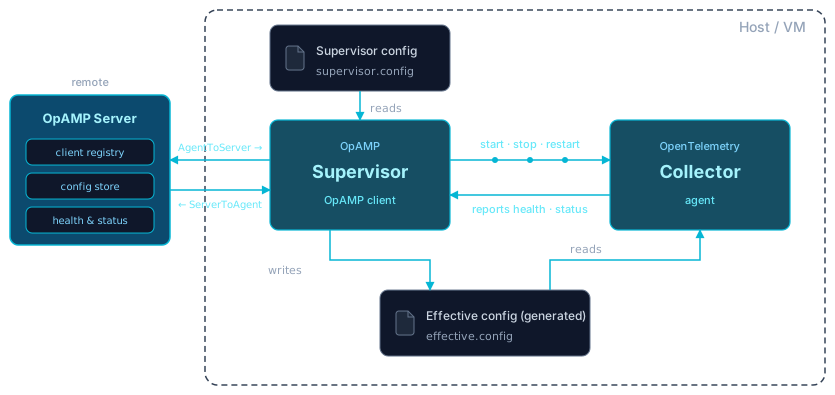
And with the spec defined all we need is a client and a server that conform to that spec in order to enable fleet management, right? Exactly, and that's where the OpAMP Supervisor comes in. The Supervisor is a functioning OpAMP Client that speaks the OpAMP Server's language, allowing it to receive instruction from the server. And it doesn't just communicate, it reacts; it is the orchestrator managing the agent, updating it, and reporting on it. It protobuf-encodes the AgentToServer properties defined above and handles the server response. For example a server might respond with a new configuration and (if enabled) the Supervisor will shut down the agent, apply the new configuration, and restart it so that the agent begins running the new config.
How the Supervisor behaves is defined by a set of capability toggles set in a configuration file. The full list of capabilities can be found in the Supervisor Configuration documentation, but properties particularly useful for fleet management are:
reports_effective_config passes the current agent's active configuration to the server.
accepts_remote_config accepts server response configurations.
reports_health reports agent health.
Upon starting the Supervisor, the OpAMP server is contacted and the message exchanges begin, the responses are handled by the supervisor, and the orchestration ensues. An example of a supervisor architecture configured to manage a collector configuration would look like:
OpAMP Supervisor: Install
To install the Supervisor, the first thing you want to do is locate the Supervisor binary that matches your collector's version. It's not strictly necessary that the versions match, but it's recommended because the Supervisor generates a managed version of the collector's active yaml (stored as "effective.yaml") and of course you want the generated yaml to be supported by your collector. SSH into the server you're deploying the Supervisor on and use curl to download the binary.
# Download opampsupervisor v0.140.0 (linux/amd64) and verify checksum
curl -fL -o opampsupervisor \
  "https://github.com/open-telemetry/opentelemetry-collector-releases/releases/download/cmd%2Fopampsupervisor%2Fv0.140.0/opampsupervisor_0.140.0_linux_amd64"

echo "497fa31f1dead871a38b4b1969abb85f41cf8949aa4596ba9b750306f7a1ff14  opampsupervisor" | sha256sum -c -

chmod +x opampsupervisor
Now, using your favorite archaic Linux editor (vi for me), create a yaml config (let's name it supervisor-config.yaml). A very basic instance might look like this:
# supervisor-config.yaml
server:
  endpoint: ${OPAMP_ENDPOINT} # <-- URL to the OpAMP Server
  headers:
    Authorization: ${BEARER_TOKEN} # <-- Server Security Bearer Token
  tls:
    insecure_skip_verify: false
    insecure: false
capabilities:  # <-- Toggle your desired capabilities (see Capabilities link above)
  reports_effective_config: true
  reports_health: true
  accepts_remote_config: true
  reports_remote_config: true
  accepts_opamp_connection_settings: true
agent:
  executable: ${EXECUTABLE_PATH} # <-- Path to your existing Otel collector executable
  config_files:
    - ${CONFIG_PATH} # <-- Path to your existing Otel collector configuration
storage:
  directory: ${STORAGE_DIRECTORY} # <-- Path to Supervisor's designated "work" files (output files, logs, etc.)
With the config completed, start the supervisor providing the supervisor-config.yaml as the "config" argument.
./opampsupervisor --config ./supervisor-config.yamlIf you've set everything up correctly, you should receive a published configuration from the server and the collector should start magically working.
That's all good news. But...
The Bad News
With all this talk of protocols, protobufs, and delegation, you might think "stick a fork in it, fleet management is done!" Not so fast. So far we've identified the client (Supervisor), the communication protocol (OpAMP), but we haven't discussed the server.
The OpAMP Server is a complex service that must conform to the spec and manage the information necessary to operate a fleet of machines. This includes things like client instance registration, token management (assuming you want security), configuration management (who gets what config), and many other challenges. And while the Supervisor is available in the Open Telemetry Contrib repository, there isn't a comparable OpAMP Server and building one is a significant undertaking that carries its own set of risks. Additionally there aren't many good options available in the market. So we've got 2 out of 3 pieces of the puzzle and regardless of what Meat Loaf said, it ain't good.
Great, so we got you all excited for a solution and just dashed your hopes right? Well hold on, as promised there is...
The Great News
You could fill that last 1/3 gap by building your own server that conforms to the OpAMP spec, maintains a database, ensures security, manages concurrency, and all the other goodness that comes with rolling your own solutions. Or you could deploy the Supervisor using Telflo's Fleet Management solution and immediately gain control of your fleet. As a platform Telflo provides many services, one being that missing server piece, and it's incredibly easy to set up and deploy. If you've already built a configuration version using Telflo's pipeline editor, managing a fleet is as easy as:
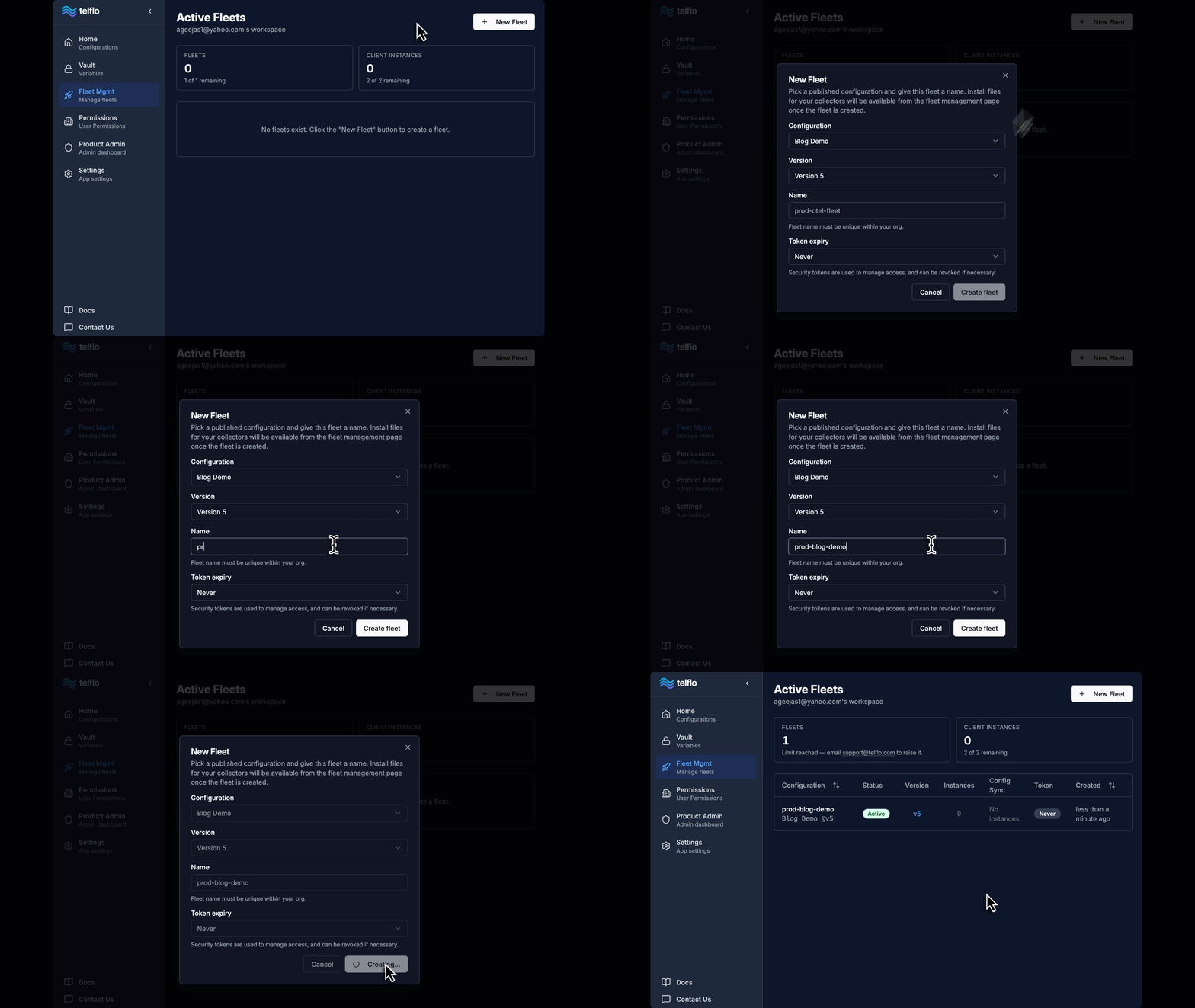
1. Define the Fleet
Within the Fleet Management page, create a new fleet linking the configuration that you want
applied to your collection of machines.
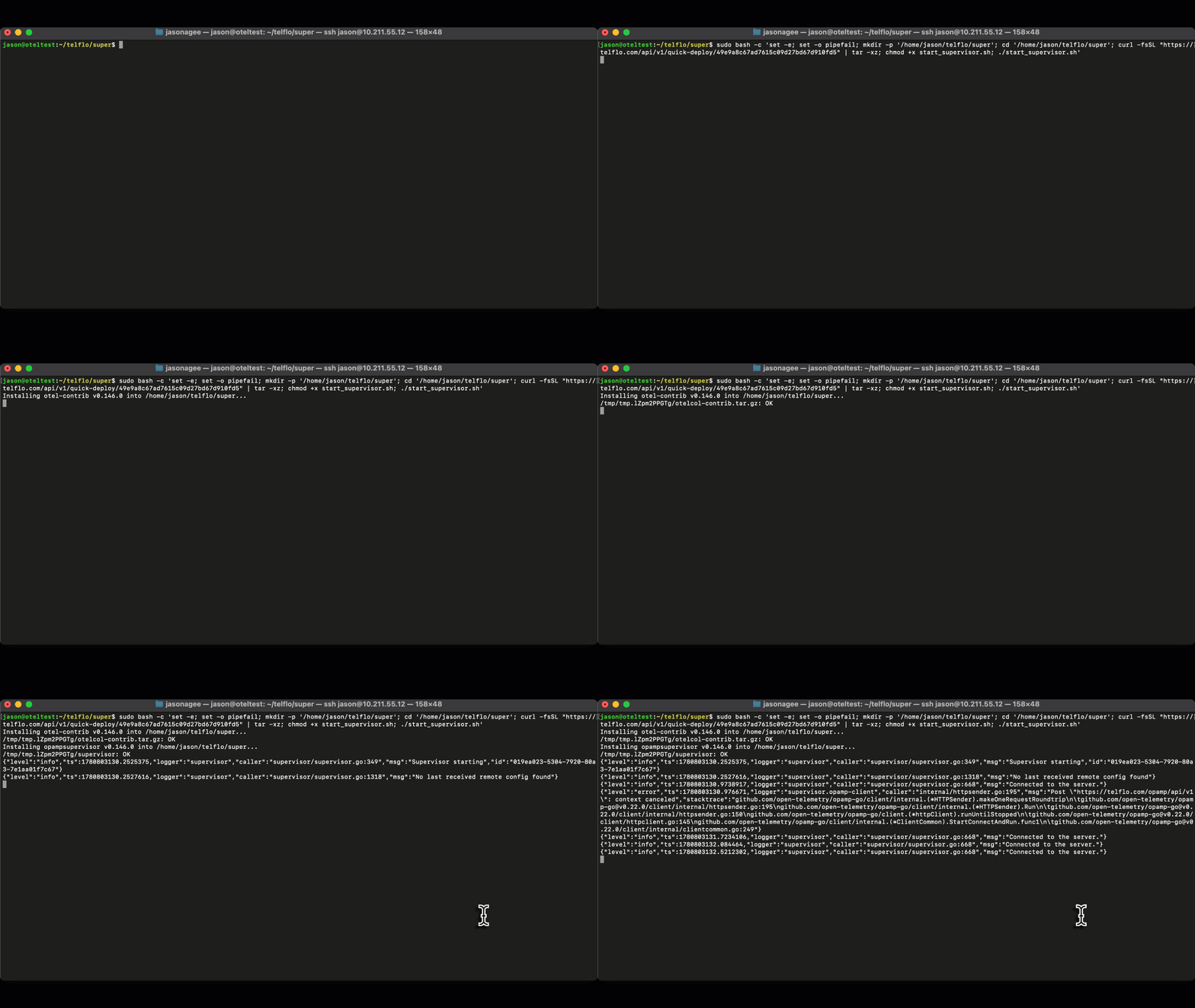
2. Deploy the Files
Navigate to the Fleet and create a deployment. Select the Quick Deploy option to copy the
quick deploy instructions to the clipboard.
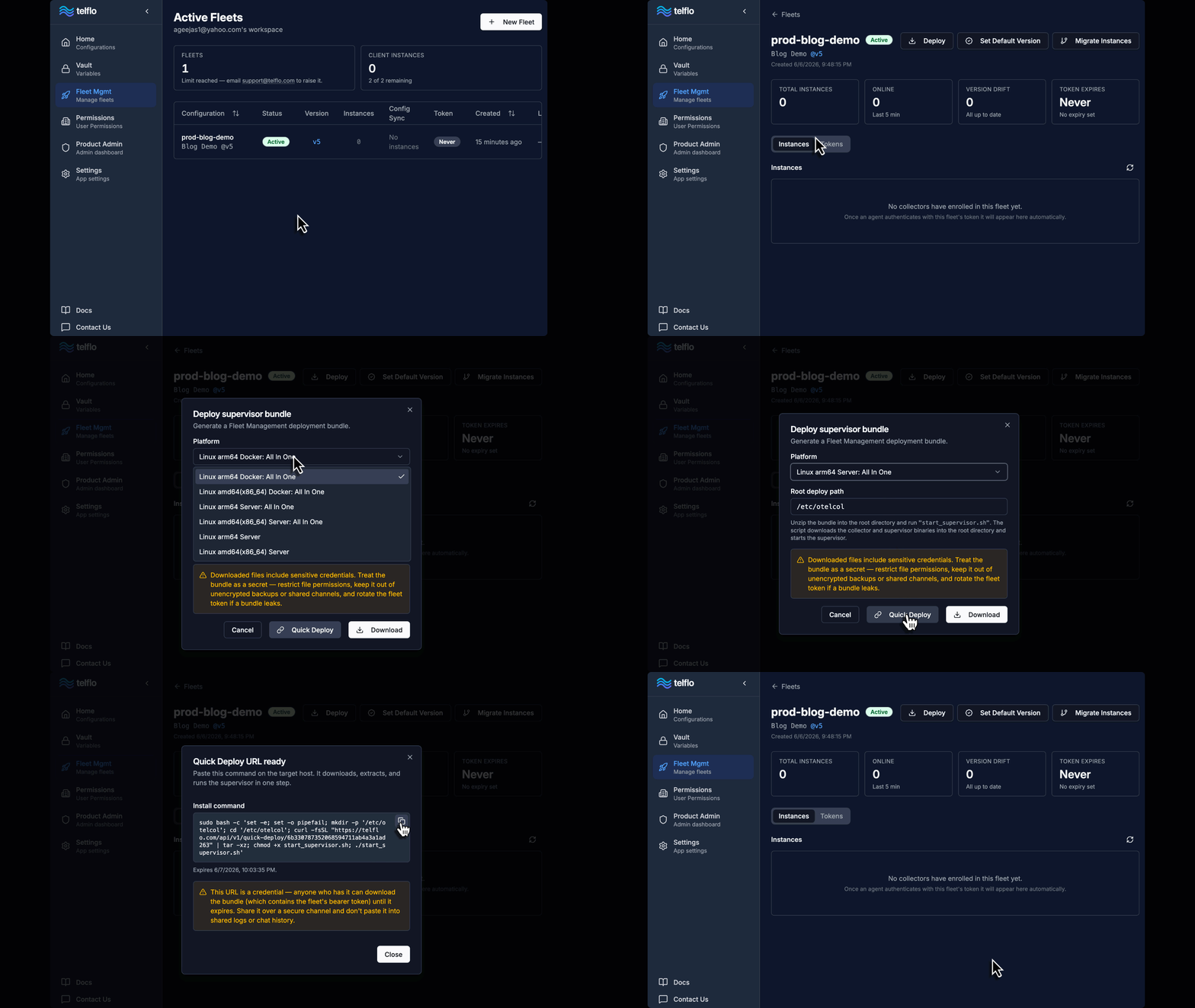
With the quick deploy instructions on the clipboard, SSH into a machine and paste the instructions.
This downloads all files and starts the supervisor.
3. Celebrate Your Success
Check back in Telflo to verify the managed client instance is listed in the fleet and then proceed to brag about your tech prowess. Heck, take the day off. You've earned it.
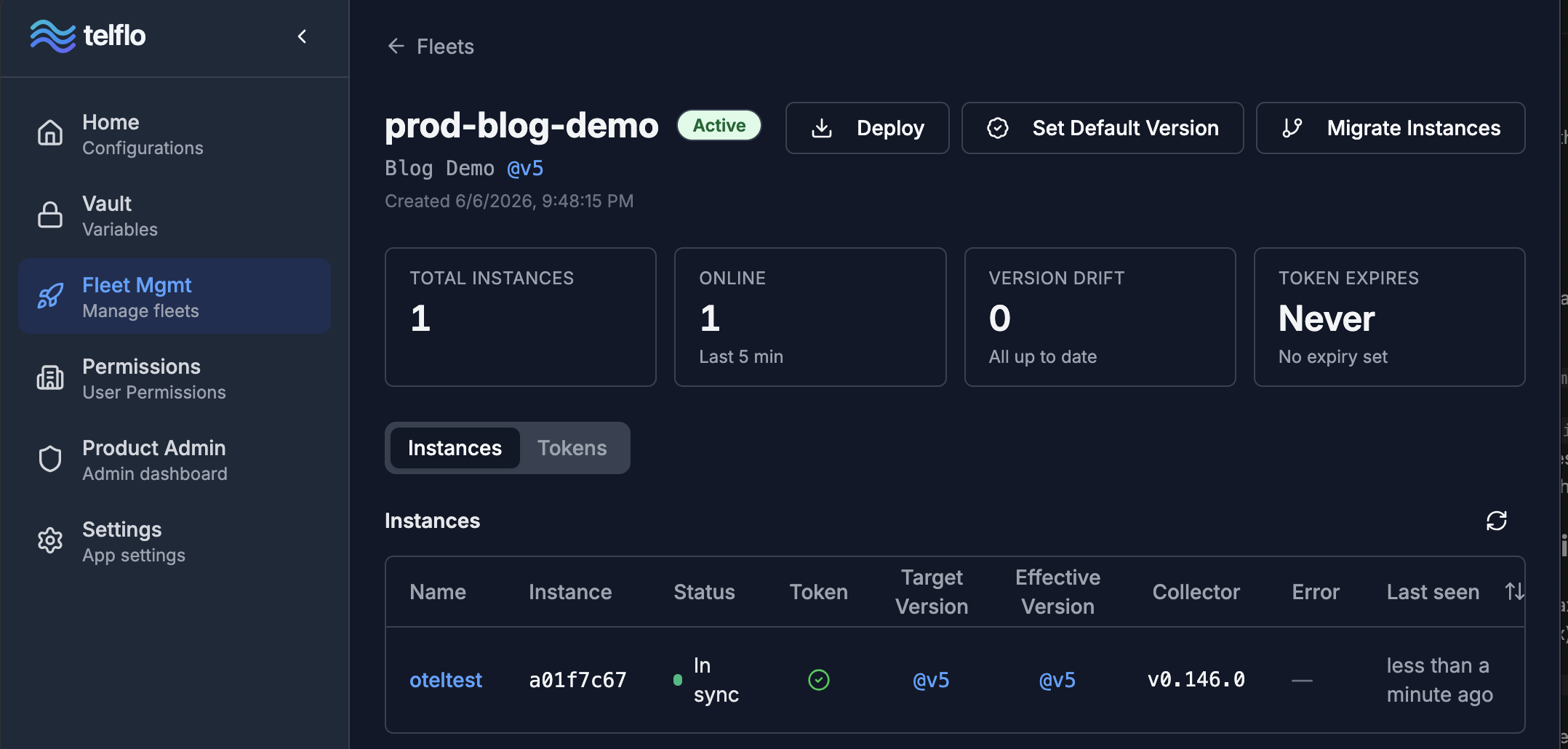
That's it! In just a few easy steps you're off and running with fleet management. And this not only eliminates all of the previously identified maintenance issues, it also provides many other benefits the platform offers such as visual configuration design, AI assistance, YAML validation, configuration testing, version management, and token management. Now in Beta, telflo.com is the best option to enable fleet management within your organization.
Manage your OpenTelemetry collectors with Telflo today.
Design, test, and deploy OpenTelemetry Collectors in one platform.
Sign up now