
Sometime in the past year, leveraging an agent became a normal part of debugging production. AI use at work is near universal now; Google's 2025 DORA report put it at 90% of software professionals, with a median of two hours a day. Observability vendors moved early. Honeycomb had an MCP server in preview by spring 2025. Datadog's went GA this March. Splunk ships one preinstalled in current Splunk Cloud releases. It's safe to say, pretty much any vendor on the Gartner Observability MQ has an MCP server now.
MCP, if it hasn't crossed your desk yet, is the open protocol that lets an AI agent call another product's tools. Anthropic published it in November 2024, and it was donated to a Linux Foundation project in December 2025, at which point its SDKs were being downloaded 97 million times a month.
The CLIs came right behind the MCP servers. New Relic announced one this month for running investigations from the terminal, and Coralogix ships one alongside its MCP server.
Almost all of it does the same job. It lets an agent read your telemetry and answer questions about it: which logs, which traces, why a service is slow, what changed before the alert fired. Where write tools exist at all, they mostly stop at dashboards, monitors, and incident notes.
Writing the config is the easy part
Ask a coding agent for a collector config and you get plausible YAML in seconds. The hard part is everything after that. Does it load on the collector version you run? Are the processors in an order that works? Did that transform statement actually do anything? And once you have the correct file, how do you get it onto hundreds of collectors?
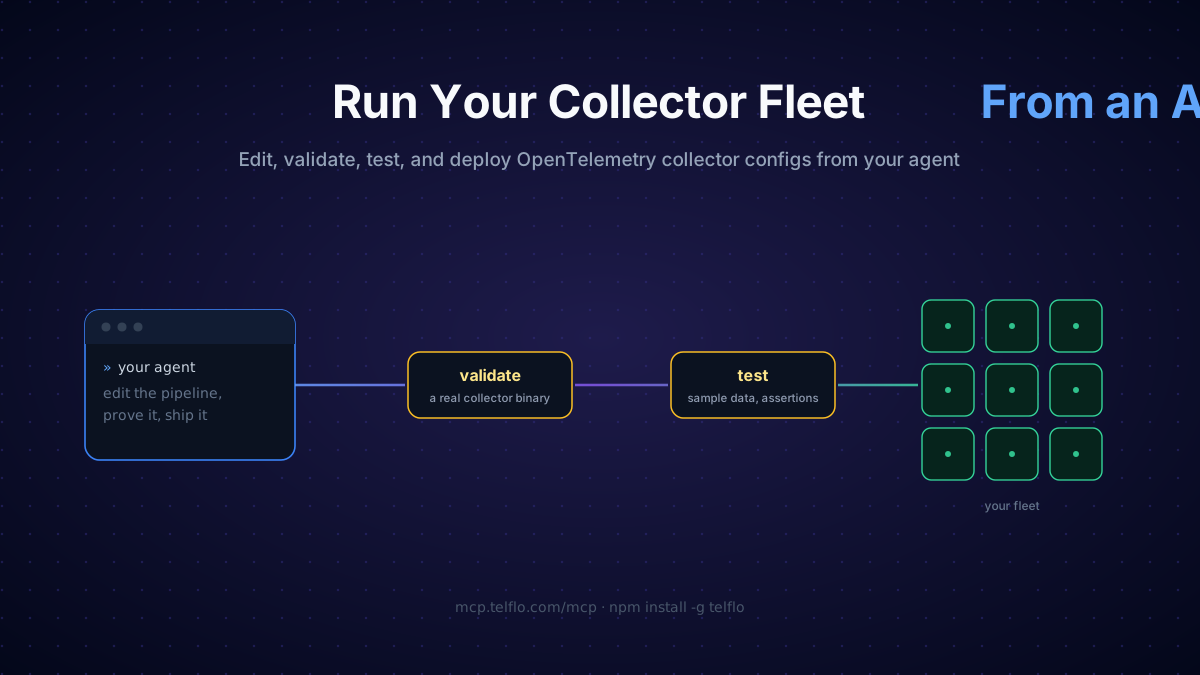
The Telflo MCP server and CLI give an agent that whole job, with feedback at each step. It writes the YAML, checks that it loads on the collector version it targets, runs sample data through it to see what comes out, and publishes a numbered version it can deploy to the fleet or roll back. When a step comes back wrong, the agent fixes the YAML and tries again.
For example, a service is sending traces, but the spans are missing the attributes your dashboards group by, like the release version or the HTTP route. The agent adds them at the collector, checks they show up in the test output, and rolls it out. Another example could be during an incident; the agent can turn collection up for the one service that matters, then put the previous version back when things calm down.
Where the time goes
Most of what an agent interface buys you here is time. Running a collector fleet mostly means making small changes many times; add a redaction rule to every pipeline that touches logs, bump a subset of collectors to the next release, get an install command for a new host etc. In a fleet tool, each of these is a documented, multi-step walkthrough: make an edit, validate it, test it, then roll it out using a UI that you have to click through one group at a time.
What we built
Telflo is a control plane for OpenTelemetry collector fleets: you author real collector YAML, version it, and push it to the collectors connected to your organization. And now, you can do all of these actions manually within Telflo, and in both kinds of agent interfaces.
The CLI installs with npm install -g telflo, and telflo login signs it in. It can push, validate, test, and deploy configurations from a terminal, from CI, or from a coding agent, and telflo skills install drops a skill into your repo so the agent you are using knows the commands without being taught. The CLI docs cover the full command set.
The MCP server is hosted at https://mcp.telflo.com/mcp. It has 21 tools, which is the CLI's command set minus the parts that only make sense on your machine. Sign in from your MCP client through the browser, or hand the agent a service-account token, a key you create in Telflo's settings and scope to read or read & write. The MCP docs list all 21 tools.
Here is the loop an agent runs: read the config, edit it, validate, test, publish, deploy.
The middle two steps are where most of the work went. validate_configuration runs the YAML against a real collector binary, the same collector version that configuration targets, so if a component was renamed a few releases ago, it fails inside the agent's loop instead of after you deploy on your real collectors. run_pipeline_test starts a sandboxed collector, feeds it sample telemetry, and asserts on what comes out the other end. For example, if the agent rewrote your redaction rule, this is where you learn whether anything still gets redacted.
Pushes create drafts and versions, deploys ship published versions, and everything the agent does shows up in the web app exactly as if you had done it in the UI, because both interfaces call the same public API with your credential.
We shipped both because they get used from different places. The MCP server is for clients that can't run your binaries: claude.ai in a browser tab, a desktop chat app. The CLI is for coding agents that already sit in a shell.
Connect an agent
You need a Telflo account first. The MCP server takes two kinds of sign-in, and the CLI mirrors both.
Sign in as yourself
In Claude Code:
claude mcp add --transport http telflo https://mcp.telflo.com/mcpRun /mcp and pick Authenticate. Your browser opens Telflo's consent page, and from then on the agent acts as you. On claude.ai, add a custom connector with the same URL and complete the same sign-in. If you are using an agent other than Claude, find the steps here.
Or hand it a service-account token
Create one under Settings, Service Accounts (organization admins), scoped read or read & write. In Claude Code it's the same command with --header "Authorization: Bearer tf_..." added. Cursor and most other clients take it in their config file:
{
  "mcpServers": {
    "telflo": {
      "url": "https://mcp.telflo.com/mcp",
      "headers": { "Authorization": "Bearer tf_..." }
    }
  }
}A token belongs to the organization rather than to a person, which makes it the right shape for shared or unattended agents. Start with a read token; it can call the read tools and none of the writes.
The CLI
npm install -g telflo
telflo logintelflo login opens your browser, and after that the CLI is signed in as you. On a remote or SSH box, telflo login --no-browser prints a URL and takes a pasted code instead. For CI and automation, skip login entirely and set TELFLO_API_TOKEN=tf_... in the environment; the same read and read & write scopes apply.
Whichever way in, ask the agent to run whoami first so you both know which organization it's acting in. Setup for other clients, the full tool list, and the security notes are in the docs.
The tool list tracks the CLI's and should grow with it. If you point an agent at your fleet and it's missing a tool or a check you need, or if you have any other questions, reach out to [email protected]!
Manage your OpenTelemetry collectors with Telflo today.
Design, test, and deploy OpenTelemetry Collectors in one platform.
Sign up now